
AI SEO for WordPress:
Get Named by AI and Ranked by Google
Last updated: October 14, 2026
Quick answer
AI SEO for WordPress combines traditional technical, on-page, and link-based SEO with structured data and content formatting that large language models can read and cite. It works by fixing WordPress-specific problems (duplicate archive pages, hidden page-builder copy, weak internal linking) while building money pages and schema that both Google and AI answer engines like ChatGPT, Perplexity, and Gemini can understand and trust. Most WordPress sites need three to six months of consistent work before rankings and AI citations shift in a measurable way.
Key takeaways
- AI SEO for WordPress means optimizing a site so it ranks in Google and gets cited inside AI answers, not one or the other.
- WordPress creates ranking problems no other platform does: thin archive pages, page-builder copy search engines never read, and duplicate URLs from slug changes.
- AI SEO plugins can help with meta descriptions, alt text, and basic schema, but they cannot fix architecture, cannibalization, or weak money pages.
- Manual SEO and AI-assisted SEO are not competing choices. The strongest WordPress SEO work uses AI for speed and a human for judgment.
- A WordPress SEO engagement built on real strategy typically runs three to twelve months before results compound, based on site size and competition.
- Internal linking is usually the fastest, cheapest ranking lever on an existing WordPress site, and it's the one most sites never touch.
- Structured data is read by search engines as a ranking signal and by AI engines as verification that a business entity actually exists and does what it claims.
- Small business WordPress sites usually need fewer plugins and more strategic content and link work than they assume.
As seen in

What is AI SEO and how does it work for WordPress
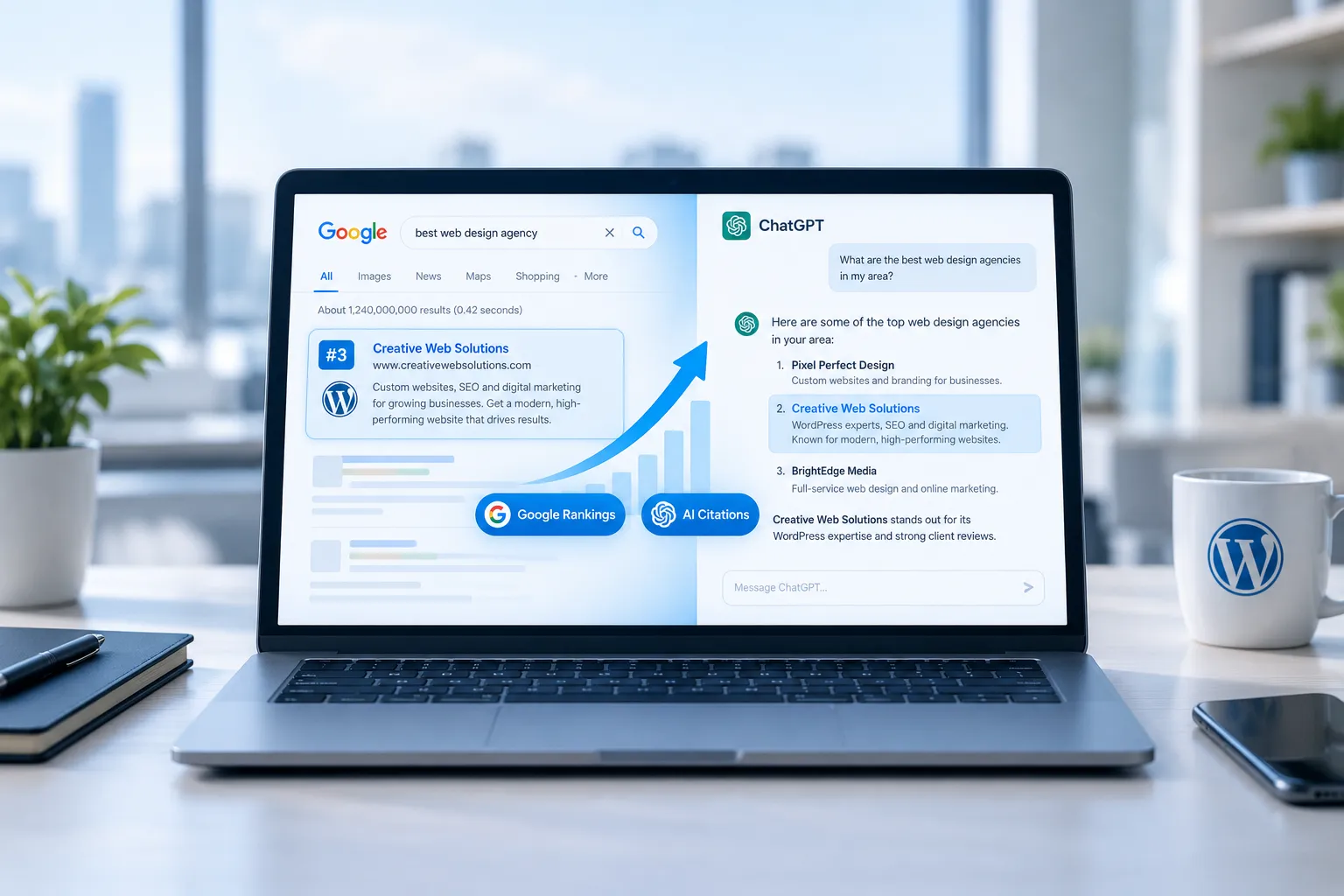
AI SEO for WordPress is the practice of optimizing a WordPress site so it ranks well in traditional Google search results and also gets named correctly inside AI-generated answers from tools like ChatGPT, Perplexity, Gemini, and Google's AI Overviews. It works by combining classic technical and on-page SEO with structured data, clear entity signals, and content written to answer specific questions directly.
AI answer engines don't crawl the web the way Googlebot does. They draw on a mix of training data, retrieval systems, and real-time search results, then decide which sources deserve a mention. For a WordPress site to get named, it needs three things in place:
- A crawlable, well-structured site. Hidden copy in accordions, missing headings, and duplicate pages confuse AI retrieval the same way they confuse Google.
- Clear entity data. Schema markup that defines the business, its services, and its location consistently across every page, not just the homepage.
- Content that answers a specific question in the first few sentences. AI systems tend to extract and cite the passage that answers the query most directly, not the passage buried in the fourth paragraph.
This is the same philosophy behind AI content optimization and entity SEO: structure the site so both a search engine and an AI model can understand who the business is and what it does, without guessing.
Why WordPress SEO is its own craft
WordPress runs more of the web than any other platform, and it's generous: it will publish almost anything you give it, including pages you never meant to have. A generalist SEO process treats a site as a list of URLs. WordPress-specific SEO work finds where the platform itself creates ranking problems and fixes them at the source.
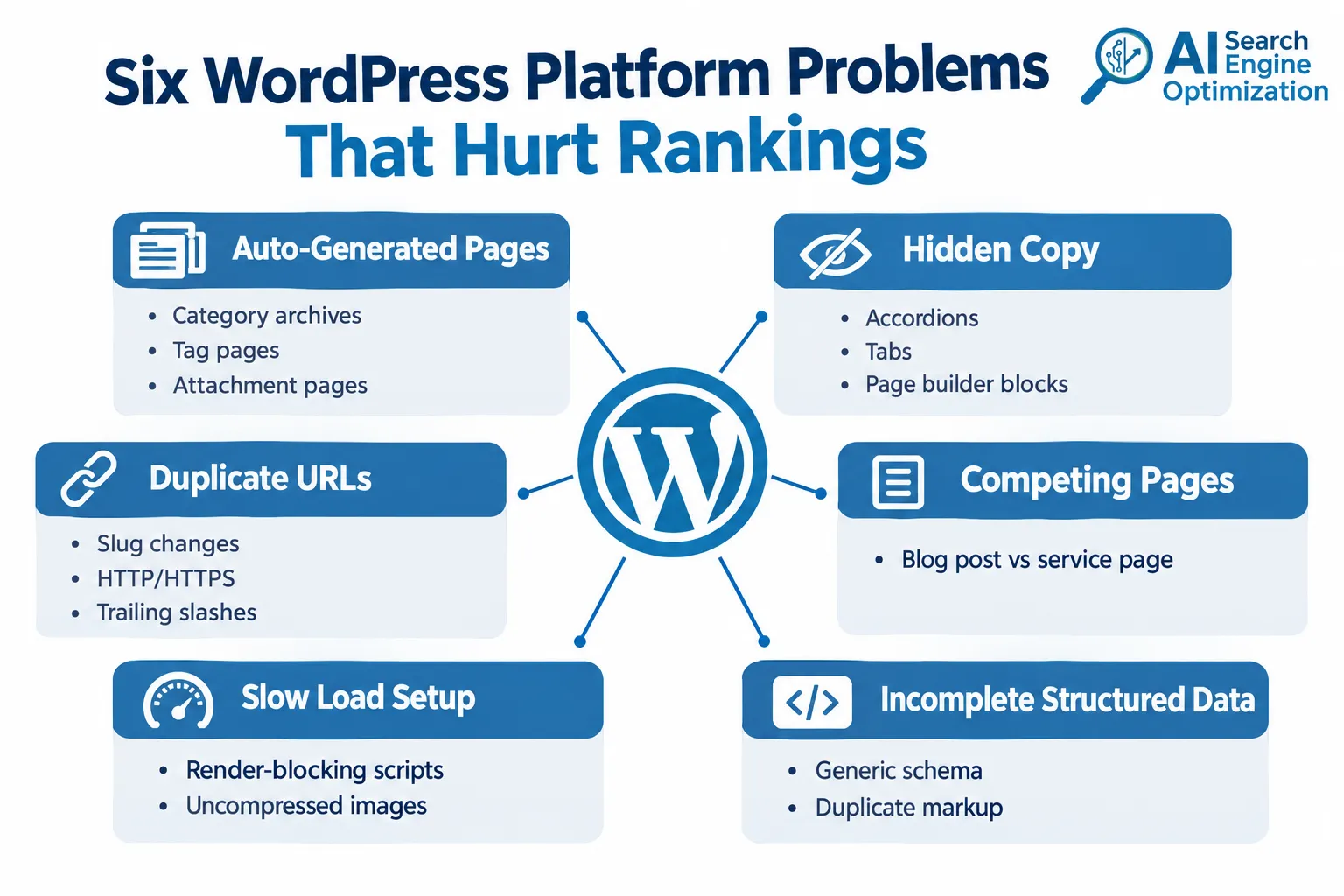
Six issues show up on nearly every WordPress site:
1. Pages the platform made without asking. Every category, tag, author, and date archive is a page in Google's eyes, and so is every uploaded image's attachment page. Most WordPress sites carry dozens of these thin, duplicate pages without knowing it. They compete with the pages that actually matter in search results.
2. Layout tools that hide the copy. Visual page builders make a site easy to design and easy to break for search: text buried in tabs and accordions, headings styled to look like headings but coded as plain text, and templates that ship a second H1 by default.
3. Addresses that change and fork. Slug edits, moved posts, trailing slashes, and HTTP/HTTPS versions each create a second address for the same page. Redirect chains and conflicting canonical tags then split whatever ranking authority the page had earned.
4. Posts and pages that fight each other. WordPress makes it effortless to publish a blog post on the same topic as a service page. Google then switches between the two in search results, and neither one settles into a stable position. This is a textbook case of keyword cannibalization.
5. Speed problems that live in the setup. Render-blocking scripts, uncompressed images, unused styles, and a caching layer nobody configured cost Core Web Vitals scores and, on mobile, rankings.
6. Structured data the platform half-writes. Out of the box, WordPress often emits generic schema describing a blog, not a business, and sometimes emits it twice.
None of these six problems is solved by an SEO plugin alone, however well it's configured. For a deeper look at the platform-side fixes, speed, and structural tuning, Google's page experience documentation is the reference worth bookmarking.
Best AI SEO plugins and tools for WordPress small business sites
The best AI SEO plugins for WordPress handle meta tags, alt text, basic schema, and content suggestions automatically, which saves time on repetitive tasks. They cannot fix site architecture, internal linking, or competitive content gaps, which is where most ranking problems actually live.
The main plugin categories, and what to check in each:
- On-page controls and sitemaps: established SEO plugins handle meta tags, XML sitemaps, and increasingly AI-assisted meta description drafting. Whatever writes the text, the output still needs to follow Google's snippet guidance.
- Schema templates: schema generators and content analysis are only as good as the markup they emit. Google's structured data introduction defines what Search can actually read and reward.
- AI-generated meta, alt text, and schema: generation features speed up repetitive writing. Google's guidance on AI-generated content is clear that quality, not how the text was produced, is what earns visibility.
- All-in-one bundles: some plugins combine schema, redirection, and AI-written suggestions in one package. Google's own overview of SEO work is a useful checklist for judging whether any bundle covers what actually matters.
- AI visibility tracking: the gap traditional plugins never covered is performance inside ChatGPT and the other AI engines. Search Engine Land's measurement analysis maps what is actually trackable there.
- AI-era visibility platforms: a newer category is built entirely around AI search visibility. Search Engine Land's guide to measuring brand visibility in AI search shows the metrics that matter.
- AI search preparation: preparing WordPress content for AI engines comes back to Google's AI features documentation: clear structure, direct answers, and crawlable pages.
Choose a plugin if: the site is small, the owner manages it directly, and the main need is consistent meta tags, sitemaps, and basic schema without hiring anyone.
Don't rely on a plugin alone if: the site has 50+ pages, multiple services competing for the same searches, or has stalled in rankings despite "green lights" in the plugin's own checklist. A plugin can't tell you that two of your pages are cannibalizing each other or that your internal linking is actively working against your money pages.
How to optimize WordPress for Google with AI tools
Optimizing WordPress for Google with AI tools means using AI to speed up research, writing, and auditing, while keeping human judgment over strategy, prioritization, and anything published to the live site. AI tools are genuinely good at pattern recognition across large data sets; they're weaker at deciding which of twenty findings actually matters for a specific business.
A practical sequence:
- Audit crawlability first. Confirm Google can actually render the page content, not just the HTML shell, especially on page-builder sites.
- Map keywords to pages. Use keyword mapping to assign one primary search intent per page before writing anything.
- Check for cannibalization. Pull the site's ranking history to see which pages are already competing for the same queries.
- Rebuild structured data. Replace generic, platform-default schema with organization, service, and FAQ markup specific to the business.
- Fix internal linking. Route authority from strong pages to the pages closest to ranking, not just to the newest post.
- Verify on the live site. Confirm changes actually published, caches cleared, schema validates.
AI tools can accelerate steps 1 through 4. Step 5 and step 6 still need a person checking the live result against the plan.
AI SEO WordPress vs manual SEO: which is better
Neither AI-only nor fully manual SEO wins outright. AI tools are faster at research, pattern detection, and first-draft content; manual review is still necessary for strategic decisions, brand voice, and verifying that AI-generated claims and schema are actually accurate.
| Factor | AI-assisted SEO | Fully manual SEO |
|---|---|---|
| Speed of research and audits | Fast, can scan hundreds of pages quickly | Slower, limited by human hours |
| Content quality control | Needs human review for accuracy and voice | Higher baseline quality, slower output |
| Strategic prioritization | Weak without human input | Strong, but time-intensive |
| Schema and technical fixes | Can flag issues, rarely implements correctly alone | Requires developer involvement |
| Cost at scale | Lower per page | Higher per page |
| Risk of generic output | Higher if unsupervised | Lower |
Choose AI-assisted SEO if: the site needs volume (lots of pages, lots of FAQ content) and has someone reviewing output before publishing.
Choose manual SEO if: the site is small, highly competitive, or the business depends on precise, differentiated positioning that generic AI drafts tend to flatten.
In practice, the strongest approach blends both: AI for speed, a person for judgment. That's the model behind AI SEO automation done properly.
Can AI SEO plugins improve my WordPress ranking, and does AI SEO actually work for WordPress blogs
Yes, AI SEO plugins can improve rankings for specific, narrow tasks like meta tags, alt text, and basic schema, but they rarely move rankings on their own for competitive terms. AI SEO works for WordPress blogs when it's paired with real keyword strategy and internal linking, not when it's limited to plugin automation alone.
What plugins reliably help with:
- Consistent title tags and meta descriptions across every post
- Alt text generation at scale for image-heavy blogs
- Basic FAQ and article schema
What plugins typically can't fix:
- Blog posts competing with each other for the same keyword
- Thin or duplicate content from tags, categories, and archives
- Weak backlink profiles
- Content that doesn't match what's already ranking on page one
A blog that publishes consistently but never checks for cannibalization or internal linking will plateau regardless of which plugin it runs. This is a known pattern; see AI SEO vs traditional SEO for how the two approaches actually combine rather than compete.
Common mistakes with AI SEO on WordPress
The most common mistake is treating an AI SEO plugin as a complete strategy rather than one tool inside a larger plan. A plugin reporting "all green" checkmarks tells you almost nothing about whether a page can actually beat what's currently ranking for that search.
Other frequent mistakes:
- Publishing AI-written content without fact-checking. AI models can generate confident, specific-sounding claims that aren't accurate, which damages trust with both readers and search engines.
- Letting page builders hide copy from crawlers. Content inside tabs or accordions that never renders in the page source won't get indexed properly.
- Ignoring duplicate schema. Many WordPress themes and plugins each add their own structured data, and the result is conflicting or duplicated markup that confuses rather than clarifies.
- Skipping internal links on new content. Every new post or page needs to connect to and from existing pages; orphaned pages rarely rank.
- Measuring rankings only, never inquiries. A page that ranks but never converts a visitor into a lead isn't actually working.
AI SEO WordPress setup and installation guide for beginners
Setting up AI SEO on WordPress starts with an audit, not a plugin install. The order matters: fix what's broken structurally before adding new tools or content on top of it.
A beginner-friendly setup sequence:
- Run a technical audit. Check for duplicate archive pages, broken redirects, and whether page-builder content actually renders in the page source.
- Install one SEO plugin, not three. Multiple SEO plugins running simultaneously often create duplicate schema and conflicting sitemaps.
- Set up Google Search Console and connect it to the site. This is the baseline for measuring anything that happens next.
- Map every page to one primary keyword. Avoid letting two pages target the same search.
- Write or rewrite the organization schema. Confirm it matches the business name, address, and services exactly as they appear on the page.
- Fix internal links before adding new content. This is usually the fastest-moving lever available.
- Publish new content in clusters, not single isolated posts, so related pages reinforce each other.
- Track both Google rankings and AI mentions separately. They don't move on the same timeline or for the same reasons.
Common beginner mistake: installing an AI SEO plugin and assuming it replaces steps 1, 4, and 6 above. It doesn't.
How much does AI SEO for WordPress cost
AI SEO for WordPress ranges from free (using a plugin's built-in AI features) to several thousand dollars a month for a full-service engagement that includes strategy, content, technical fixes, and link building. Cost depends almost entirely on site size, competition, and how much of the work is hands-on versus automated.
Rough cost tiers, based on general market patterns in 2026:
- DIY with a plugin: free to roughly $100/month for premium plugin tiers, suitable for very small, low-competition sites.
- Freelance or consultant-led work: typically a few hundred to a few thousand dollars per month, depending on scope.
- Full-service agency engagement: often several thousand dollars per month when strategy, content production, technical implementation, and link building are all included.
Decision rule: if the site has fewer than 20 pages and faces little local competition, a plugin plus occasional consultant review may be enough. If the business depends on ranking for competitive commercial terms, a fuller engagement that includes content, technical fixes, and link building usually pays back faster than piecemeal tool purchases. See AI SEO investment and ROI for how that payback is typically measured.
How long does it take to see results with AI SEO WordPress
Most WordPress sites need three to six months before Google rankings show a meaningful shift, and AI citation changes can take a similar or slightly longer window since AI platforms update their retrieval indexes on their own schedules. Highly competitive terms can take longer; low-competition local terms can move faster.
What typically happens in each phase:
- Weeks 1 to 4: Technical fixes go live (duplicate pages removed, schema corrected, internal links installed). Rankings may shift slightly from internal linking alone.
- Months 2 to 4: New and rebuilt content starts indexing and competing. Early position movement on less competitive terms.
- Months 4 to 6+: Compounding effects from content clusters, consistent schema, and backlinks start showing in both Google rankings and AI mentions.
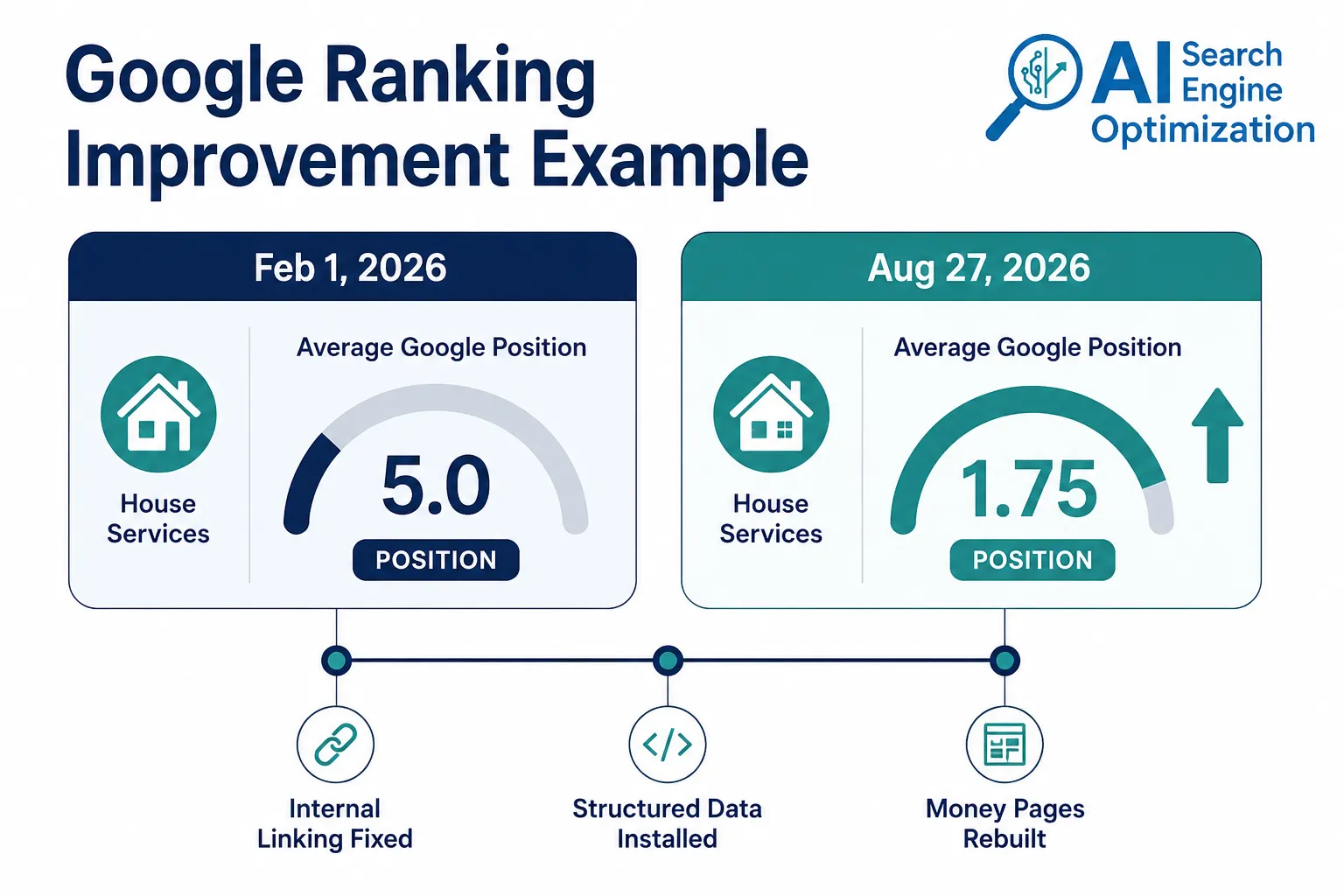
One published example: a Los Angeles bathtub reglazing company's WordPress site moved from an average Google position of 5.0 on February 1, 2026 to 1.75 by August 27, 2026, across four tracked commercial keywords, with thirteen keywords reaching the top five by the end of that period. That's roughly seven months of consistent work, not a quick fix.
Edge case: a brand-new domain with no existing authority will almost always take longer than an established site with years of indexed history, even with identical on-page work.
Alternatives to AI SEO plugins for WordPress
The main alternatives to relying solely on AI SEO plugins are hiring a specialist consultant, working with a full-service WordPress SEO agency, or building a custom internal process that combines a lighter plugin with manual strategic review.
- Specialist consultant: best for businesses that want direct, personal accountability and a single point of contact rather than a rotating team.
- Full-service agency: best for businesses that want strategy, content, technical fixes, and link building handled together rather than coordinated across separate vendors.
- Hybrid in-house approach: a lighter plugin for basic hygiene, paired with quarterly manual audits. Works for small sites with limited budget but still needs someone with SEO judgment reviewing the output.
See in-house SEO vs agency for AI search for a fuller breakdown of when each model fits.
AI SEO WordPress for ecommerce sites
AI SEO for WordPress ecommerce (typically WooCommerce) sites focuses heavily on product schema, category page architecture, and avoiding duplicate content from filters and variations, since ecommerce platforms generate far more automatic pages than a standard business site.
Specific priorities for ecommerce:
- Product schema with accurate pricing, availability, and reviews, kept current as inventory changes.
- Category page structure that avoids thin, near-duplicate pages created by filter and sort parameters.
- Canonical tags set correctly across product variations (size, color) to prevent duplicate content penalties.
- Internal linking between related products and category pages to distribute authority evenly.
Decision rule: if the store has more than a few hundred SKUs, manual schema management becomes impractical; this is one of the clearer cases where automated tools genuinely earn their cost. For broader coverage of this topic, see ecommerce AI SEO.
What changes on your WordPress website
Analysis only matters once it's installed on the live site. A proper WordPress SEO engagement ends with changes a visitor and a search engine can both see, not a report sitting in an inbox.
Six things should visibly change:
- Money pages rebuilt to meet the bar of whatever is already ranking for that exact service or area.
- Supporting content published in clusters that link to and from the money page without competing against it.
- Internal links installed directly, not just recommended, with orphan pages connected and authority routed to near-ranking pages.
- Structured data installed as a mirror of the page, with one organization record sitewide and no duplication.
- On-page term balance corrected, removing over-used keywords and adding the vocabulary that top-ranking competitors already use.
- Everything verified live, with caches cleared and schema validated before it's reported as finished.
This is the model behind the Rank Intelligence Engine: diagnosis, content, and implementation connected in one system rather than split across a strategist, a writer, and a developer who never talk to each other.
FAQ
What's the difference between AI SEO and regular SEO?
AI SEO adds a focus on structured data, entity clarity, and direct-answer content formatting so AI platforms like ChatGPT and Gemini can cite a business accurately. Regular SEO focuses on traditional Google ranking factors alone.
Do I need to remove old SEO plugins before adding AI SEO features?
Running more than one full SEO plugin at once often creates duplicate schema and conflicting sitemaps. Pick one primary plugin and disable overlapping features in any others.
Can AI SEO plugins write content for my WordPress site automatically?
Most can generate drafts, meta descriptions, and alt text, but published content should be fact-checked and edited for accuracy and brand voice before it goes live.
Will AI SEO help a brand-new WordPress site rank faster?
It can speed up technical setup and content production, but a brand-new domain still needs time to build authority and index history, regardless of which tools are used.
Is AI SEO worth it for a small local business WordPress site?
Often yes, especially for schema accuracy and consistent meta tags, but the bigger wins usually come from fixing site architecture and internal linking, which plugins alone don't handle.
How do I know if my WordPress SEO plugin is actually working?
Check Google Search Console for actual ranking and click changes over 8 to 12 weeks, not just the plugin's internal "green light" score, which only measures on-page checklist items.
Does AI SEO replace the need for backlinks?
No. Link building and digital PR remain a core ranking factor; AI SEO improves how a site is structured and described, not how much external authority it has earned.
What's the biggest WordPress-specific SEO mistake businesses make?
Letting the platform auto-generate category, tag, and attachment pages without reviewing which ones should actually be indexed, which creates duplicate content that competes with real pages.
References
- Google Search Central: Understanding page experience in Google Search results
- Google Search Central: Control your snippets in search results
- Google Search Central: Introduction to structured data markup
- Google Search Central Blog: Google Search's guidance about AI-generated content
- Google Search Central: Do I need SEO?
- Google Search Central: AI features and your website
- Search Engine Land: Measuring GEO, what's trackable now and what's still missing
- Search Engine Land: How to measure brand visibility in AI search